Get marketing insights first
Subscribe for actionable strategies, growth tips and useful industry insights, delivered straight to your inbox.
WordPress · CRM · Jira · JSM
A practical system view for turning four specialised platforms into one continuous experience — from first enquiry to delivery, support and the next opportunity.

The real problem
Most businesses already have the capabilities. Revenue and trust disappear in the gaps between them: the inbox nobody checks, the promise nobody transfers, the ticket with no account history.
A WordPress enquiry reaches a shared mailbox, but no CRM record, owner or immediate acknowledgement is created.
Ads → Website → CRM
The CRM says “closed won,” while delivery starts with a forwarded email and must rediscover scope, contacts and commitments.
CRM → Jira delivery
A service request arrives without contract, onboarding or account context—and its product insight never gets back to sales.
JSM ↔ CRM
The system view
Each tool keeps doing the work it is best at. The integration layer carries the minimum useful context forward and returns meaningful signals back.
Attract, explain and capture intent.
Qualify, own and grow the relationship.
Deliver scoped, visible, accountable work.
Support, resolve and protect the experience.
The journey is a loop, not a pipeline. Support themes should influence product priorities and account plans; delivery progress should inform customer communication; commercial context should help service teams make better decisions.
Design the moments between systems
The valuable event is not “email received.” It is “lead created, source preserved, consent recorded, owner assigned and next action due.”
Keep the form short for the customer; enrich the record behind the scenes with campaign, page, product and routing context.
Validate and create or update the CRM contact.
Stamp campaign, enquiry type and source page.
Send a useful acknowledgement with a clear next step.
Assign the right rep and start a response timer.
A CRM stage change should create the Jira epic or project only when a handoff contract is complete—not when sales simply changes a label.
Carry the essentials: agreed outcomes, scope boundaries, key contacts, target date, commercial tier and open assumptions. Link back to the CRM rather than duplicating the entire account.
Required fields pass a completeness check.
Jira template creates milestones, owners and risks.
Delivery status returns to the account timeline.
Customer receives a coherent welcome and plan.
Match the requester to the CRM contact or organisation and surface only what helps resolution: tier, lifecycle stage, active delivery work, known concerns and accountable relationship owner.
When support uncovers a product request, renewal risk or expansion signal, route it back to the correct system with a durable link to the original conversation.
Identify customer and organisation from a trusted key.
Show relevant account and delivery context in JSM.
Escalate linked work to product or delivery in Jira.
Return resolution, risk and opportunity signals to CRM.

Experience rule
Good integration reduces searching and re-keying. It does not recreate every database inside every tool.
Inside the work
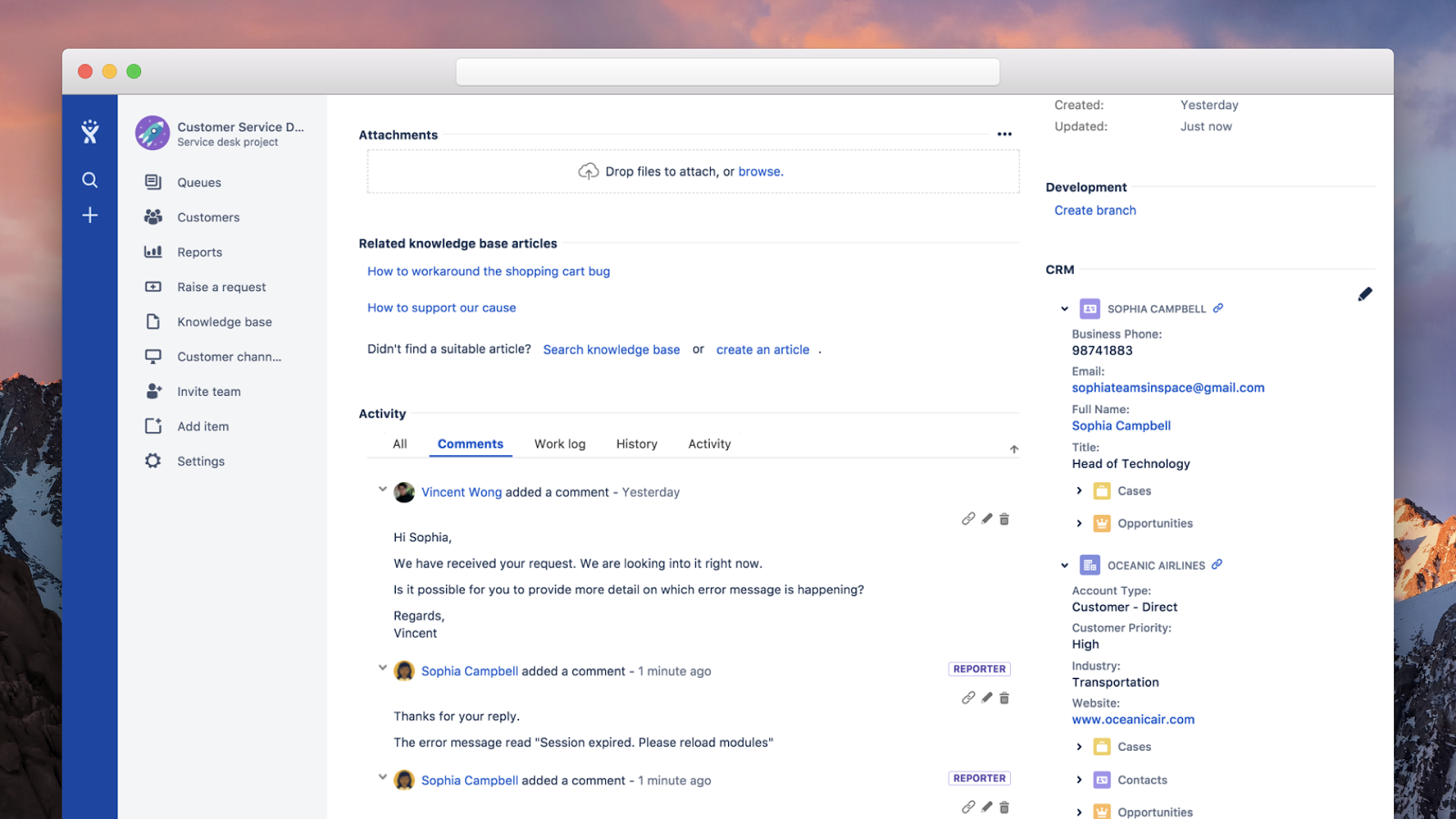
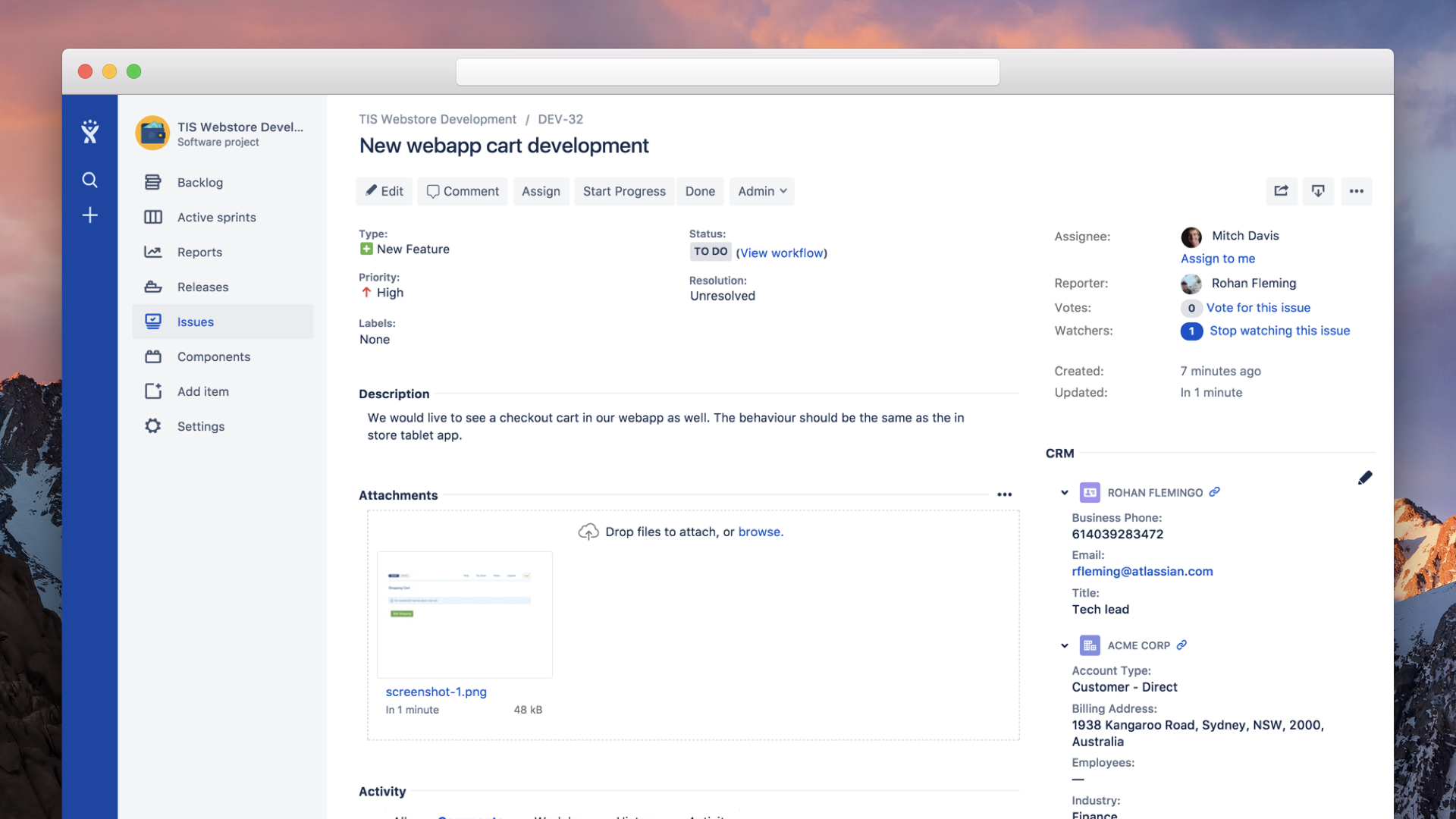
Atlassian’s CRM integration examples demonstrate the core UX principle: service and delivery teams should see relevant account information beside the issue—not hunt for it in another application.
| Business event | Minimum payload | Next owner | Success signal |
|---|---|---|---|
| Enquiry submitted | Contact, consent, source, intent and message | Sales or triage queue | Record created, acknowledgement sent, response due |
| Deal ready for delivery | Outcome, scope, contacts, date, tier and assumptions | Delivery lead | Jira work created and linked; kickoff owner notified |
| Service request raised | Requester, organisation, product, entitlement and urgency | Service queue | Context matched; SLA and routing applied |
| Signal discovered | Risk, feedback, product request or opportunity summary | Account, product or delivery owner | Linked follow-up accepted and visible to support |
A lower-risk route
A connected experience can be delivered in phases, with each stage earning the next through an observable customer or operational outcome.
Phase 01 · Capture
Fix response speed and attribution first.
Phase 02 · Deliver
Protect customer promises at the commercial handoff.
Phase 03 · Learn
Close the loop between service, product and growth.
The strategic shift
The strongest integration blueprint starts with the customer’s experience, identifies every manual handoff and gives each event an owner, a data contract and a measurable outcome.
Practical ideas for connected customer journeys, digital systems and better work across APAC.