Get marketing insights first
Subscribe for actionable strategies, growth tips and useful industry insights, delivered straight to your inbox.
Jira Software for construction
A practical operating blueprint for moving construction delivery out of scattered spreadsheets and into one connected view—from programs and packages to inspections, procurement and weekly site actions.
The strategic brief
Use Jira Software to plan, coordinate and verify delivery work. If Jira Service Management is the controlled front door for requests, Jira Software is where the project team turns those requests into sequenced, owned and visible action.
The goal is not to imitate a master program in another tool. It is to make the next decision, blocker and accountable owner visible at the level where work is actually delivered.
Connect program outcomes to projects, phases, work packages, delivery items and the subtasks completed by individual teams.
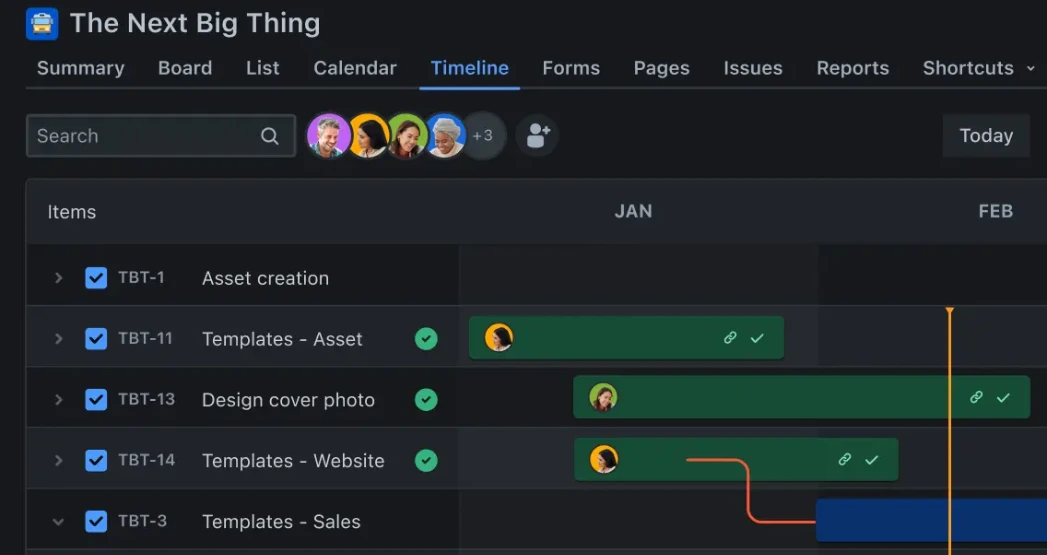
Boards, lists and timelines give design, site, procurement and quality teams focused views without duplicating the underlying record.
Dependencies, ageing and blocked status make delay visible early enough for a project manager to change the outcome.
The delivery spine
A stable hierarchy lets leaders read portfolio intent while field teams work with clear, manageable items.
Major development, capital program or client portfolio.
The project boundary for governance, delivery and reporting.
Epic-level outcomes such as structure, facade or commissioning.
A design action, site task, procurement action or quality checkpoint.
The concrete action completed by an individual or crew.
Edition note: standard Jira supports the project, Epic, work item and subtask structure. Hierarchy above Epic and multi-project planning in Plans are associated with Jira Premium and Enterprise; confirm current product entitlements before configuration.
The work system
A small vocabulary creates cleaner reports and clearer workflows. Keep the names familiar to delivery teams and make each status represent a genuine change in control.
Govern major outcomes, funding windows and cross-project decisions.
Planned → active → on hold → closedTrack package readiness from mobilisation to formal close-out.
Not started → mobilisation → in progress → completeControl review comments, consultant responses and verified resolution.
Identified → review → action → verified → closedMake near-term actions and blockers visible in the weekly look-ahead.
Open → in progress → blocked → doneFollow a long-lead item through submittal, approval, order and delivery.
Planning → approved → ordered → delivered → closedAssign rectification and require verification before final closure.
Open → rectification → verification → closed / reopenedSchedule, conduct and certify a hold point against evidence.
Scheduled → conducted → passed / failed → certifiedGive one person or crew a clear action inside the controlled item.
To do → in progress → done
The field cadence
The system earns adoption when it improves the meetings teams already run. Design a repeatable rhythm around the same live work items.
Six-week look-ahead: review readiness, dependencies and blocked packages.
Design and procurement: chase required-by dates, ageing actions and long-lead exposure.
Site huddle: focus on work due now, blockers, inspections and rectification ownership.
Flow review: close stale items, confirm evidence and prepare the executive exception view.
Operational intelligence
The best dashboard is an exception list with an owner. Track progress, blockage and ageing at the level where a decision can still be made.
Illustrative values shown for layout only; connect production dashboards to live Jira filters and agreed project baselines.
Due this week, ready versus constrained, trade owner and reason for blockage.
Open review actions, discipline, required-by date and overdue verification.
Epic progress, milestone confidence, dependencies and emerging schedule risk.
Submittals, approvals, purchase orders, logistics and delivery exposure.
Upcoming hold points, failed checks, open rectification and certification status.
Cumulative flow, work in progress, throughput and queues that are growing.
Cross-project exceptions, critical dependencies and forecast confidence.
Oldest items, cycle time by work type and repeat reopen patterns.
A practical start
Start with one active construction project and the meetings people already attend. Standardise only after the pilot reveals which fields and statuses genuinely improve control.
Keep the vocabulary small, the ownership explicit and the weekly review grounded in live Jira work—not exported slideware.
This newsletter is an editorial adaptation of the supplied “Jira Software for Construction – Detailed Use-case” study. The hierarchy, workflows, roles and 90-day pathway are implementation guidance and should be calibrated to the organisation’s delivery model, contracts and Jira edition.
Photography: Moin Uddin / Pexels and Mikael Blomkvist / Pexels . Product interface image: Atlassian .
Jira and Atlassian are trademarks of Atlassian. This independent use-case study is not sponsored by, endorsed by or affiliated with Atlassian.
Practical ideas for connected customer journeys, digital systems and better work across APAC.